
Plugin Configuration
As plugin functionality grows, you may need to define configurations to allow users to customize plugin behavior.
AstrBot provides "powerful" configuration parsing and visualization features. Users can configure plugins directly in the management panel without modifying code.
Configuration Definition
To register configurations, first add a _conf_schema.json JSON file in your plugin directory.
The file content is a Schema that represents the configuration. The Schema is in JSON format, for example:
{
  "token": {
    "description": "Bot Token",
    "type": "string",
    "secret": true
  },
  "sub_config": {
    "description": "Test nested configuration",
    "type": "object",
    "hint": "xxxx",
    "items": {
      "name": {
        "description": "testsub",
        "type": "string",
        "hint": "xxxx"
      },
      "id": {
        "description": "testsub",
        "type": "int",
        "hint": "xxxx"
      },
      "time": {
        "description": "testsub",
        "type": "int",
        "hint": "xxxx",
        "default": 123
      }
    }
  }
}type: Required. The type of the configuration. Supportsstring,text,int,float,bool,object,list,dict,template_list,file. When the type istext, it will be visualized as a larger resizable textarea component to accommodate large text.description: Optional. Description of the configuration. A one-sentence description of the configuration's behavior is recommended.hint: Optional. Hint information for the configuration, displayed in the question mark button on the right in the image above, shown when hovering over it.obvious_hint: Optional. Whether the configuration hint should be prominently displayed, liketokenin the image above.default: Optional. The default value of the configuration. If the user hasn't configured it, the default value will be used. Default values: int is 0, float is 0.0, bool is False, string is "", object is {}, list is [].items: Optional. If the configuration type isobject, theitemsfield needs to be added. The content ofitemsis the sub-Schema of this configuration item. Theoretically, it can be nested infinitely, but excessive nesting is not recommended.invisible: Optional. Whether the configuration is hidden. Default isfalse. If set totrue, it will not be displayed in the management panel.secret: Optional. Applies tostringand stringlistfields. When set totrue, the dashboard displays a password input and lets the user temporarily reveal its value. This only masks the value in the UI; it does not encrypt the value in the configuration file.options: Optional. A list, such as"options": ["chat", "agent", "workflow"]. Provides dropdown list options.editor_mode: Optional. Whether to enable code editor mode. Requires AstrBot >=v3.5.10. Versions below this won't report errors but won't take effect. Default is false.editor_language: Optional. The code language for the code editor, defaults tojson.editor_theme: Optional. The theme for the code editor. Options arevs-light(default) andvs-dark._special: Optional. Used to call AstrBot's visualization features for provider selection, persona selection, knowledge base selection, etc. See details below.
Sensitive configuration fields
Sensitive strings such as API keys, access tokens, and passwords should set "secret": true. The dashboard masks their contents by default and provides a control to temporarily reveal or hide them. String lists also support this field, which is useful when a plugin accepts multiple API keys:
{
  "api_key": {
    "description": "API Key",
    "type": "string",
    "default": "",
    "secret": true
  },
  "backup_api_keys": {
    "description": "Backup API keys",
    "type": "list",
    "default": [],
    "secret": true
  }
}
secret does not change the value or data type received by the plugin. It only masks the value in the dashboard; the original value is still stored in the plugin configuration file. Plugins should avoid logging, echoing, or otherwise exposing these values.
Configuration Internationalization (Optional)
Configuration description, hint, and select labels can follow the WebUI language. See Plugin Internationalization.
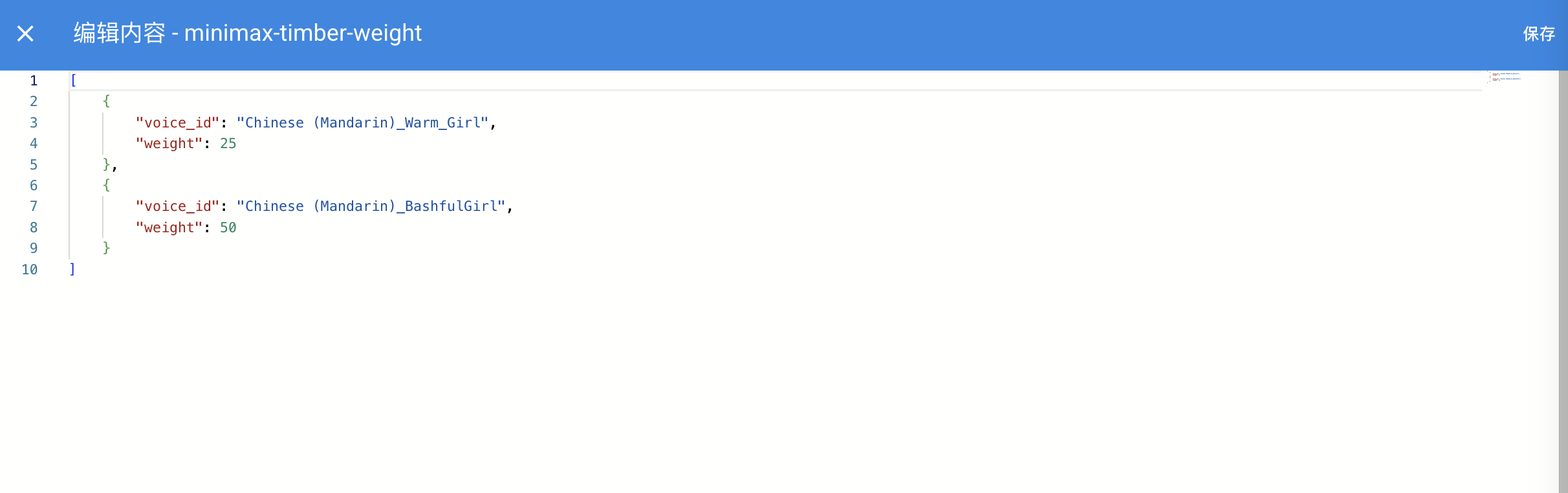
When the code editor is enabled, it looks like this:

The _special field is only available after v4.0.0. Common values include select_provider, select_provider_tts, select_provider_stt, select_persona, and select_knowledgebase, allowing users to quickly select model providers, personas, knowledge bases, and other data already configured in the WebUI.
select_provider,select_provider_tts,select_provider_stt, andselect_personareturn strings.select_knowledgebasereturns alistand supports multiple selection, so the corresponding config item should usetype: listwith a default value of[].
NOTE
For reference, AstrBot Core also uses other internal _special values, such as select_providers, provider_pool, persona_pool, select_plugin_set, t2i_template, get_embedding_dim, and select_agent_runner_provider:* (where * is a placeholder for the runner type). These are internal implementations and may change at any time — please avoid using them in plugins.
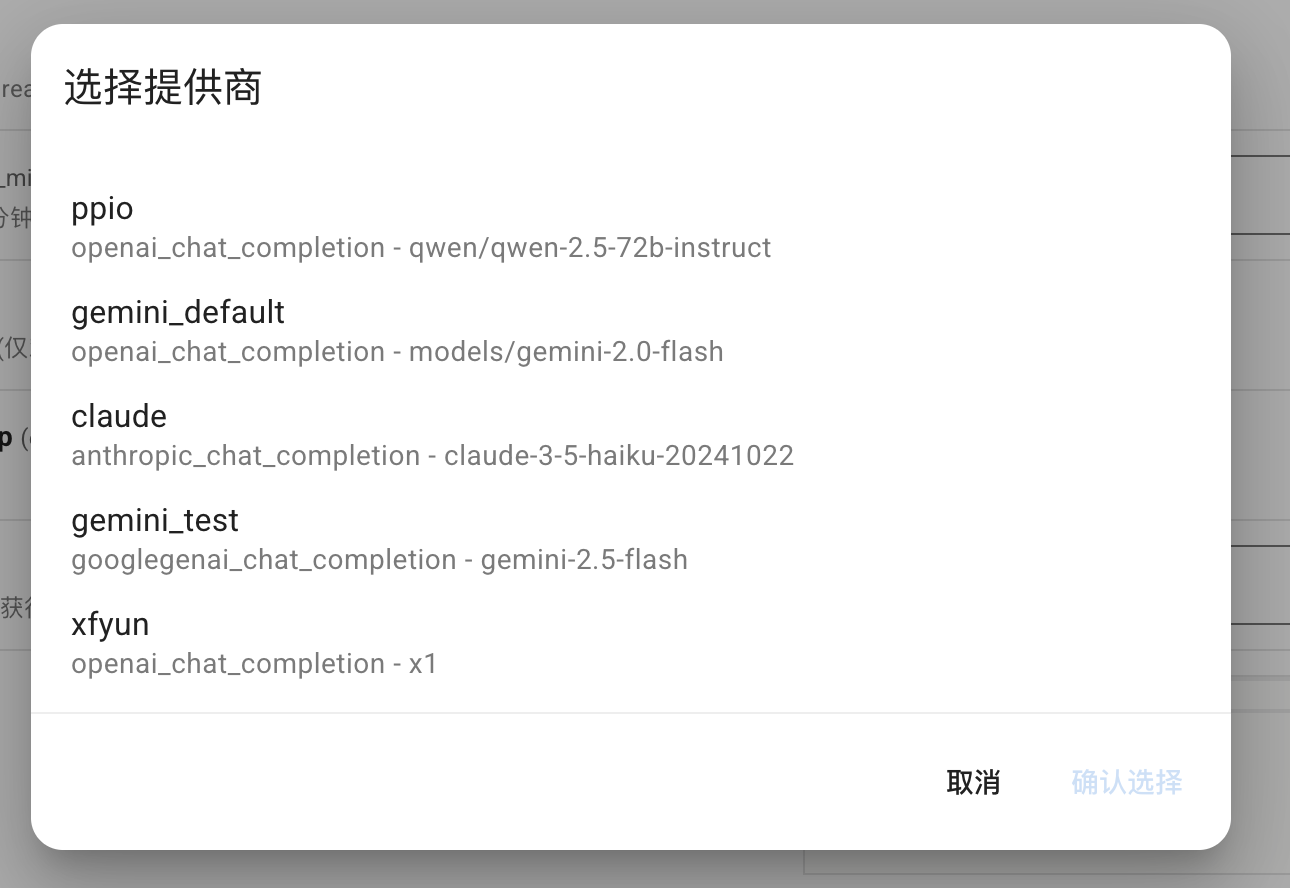
Using select_provider as an example, it will display as follows:
file type schema
Introduced in v4.13.0, this allows plugins to define file-upload configuration items to guide users to upload files required by the plugin.
{
  "demo_files": {
    "type": "file",
    "description": "Uploaded files for demo",
    "default": [],
    "file_types": ["pdf", "docx"]
  }
}
dict type schema
Used to visualize editing a Python dict type configuration. For example, AstrBot Core's custom extra body parameter configuration:
"custom_extra_body": {
  "description": "Custom request body parameters",
  "type": "dict",
  "items": {},
  "hint": "Used to add extra parameters to requests, such as temperature, top_p, max_tokens, etc.",
  "template_schema": {
      "temperature": {
          "name": "Temperature",
          "description": "Temperature parameter",
          "hint": "Controls randomness of output, typically 0-2. Higher is more random.",
          "type": "float",
          "default": 0.6,
          "slider": {"min": 0, "max": 2, "step": 0.1},
      },
      "top_p": {
          "name": "Top-p",
          "description": "Top-p sampling",
          "hint": "Nucleus sampling parameter, typically 0-1. Controls probability mass considered.",
          "type": "float",
          "default": 1.0,
          "slider": {"min": 0, "max": 1, "step": 0.01},
      },
      "max_tokens": {
          "name": "Max Tokens",
          "description": "Maximum tokens",
          "hint": "Maximum number of tokens to generate.",
          "type": "int",
          "default": 8192,
      },
  },
}
template_list type schema
NOTE
Introduced in v4.10.4. For more details see: #4208
Plugin developers can add a template-style configuration to _conf_schema in the following format (somewhat similar to nested configs):
 "field_id": {
  "type": "template_list",
  "description": "Template List Field",
  "templates": {
    "template_1": {
        "name": "Template One",
        "hint":"hint",
        "display_item": "attr_name",
        "hide_hint_in_list": true,
        "items": {
          "attr_name": {
            "description": "Attribute Name",
            "type": "string",
            "default": ""
          },
          "attr_a": {
            "description": "Attribute A",
            "type": "int",
            "default": 10
          },
          "attr_b": {
            "description": "Attribute B",
            "hint": "This is a boolean attribute",
            "type": "bool",
            "default": true
          }
        }
      },
    "template_2": {
      "name": "Template Two",
      "hint":"hint",
      "items": {
        "attr_c": {
          "description": "Attribute A",
          "type": "int",
          "default": 10
        },
        "attr_d": {
          "description": "Attribute B",
          "hint": "This is a boolean attribute",
          "type": "bool",
          "default": true
        }
      }
    }
  }
}
Saved config example:
"field_id": [
    {
        "__template_key": "template_1",
        "attr_name": "",
        "attr_a": 10,
        "attr_b": true
    },
    {
        "__template_key": "template_2",
        "attr_c": 10,
        "attr_d": true
    }
]
Templates also support these optional fields:
display_item: Specifies the key of astringitem inside the templateitems. When set, the WebUI shows that field's current value in the collapsed list of added template entries, for exampleAttribute Name: my-adapter, making it easier to distinguish multiple entries created from the same template. Dot paths are supported for fields inside nested objects, for examplemeta.name.hide_hint_in_list: When set totrue, the WebUI hides the templatehintin the collapsed list of added template entries. The template selection dropdown still shows thehint, and hints for fields inside the expanded entry are not affected.
Using Configuration in Plugins
When loading plugins, AstrBot will check if there's a _conf_schema.json file in the plugin directory. If it exists, it will automatically parse the configuration and save it under data/config/<plugin_name>_config.json (a configuration file entity created according to the Schema), and pass it to __init__() when instantiating the plugin class.
from astrbot.api import AstrBotConfig


class ConfigPlugin(Star):
    def __init__(
        self, context: Context, config: AstrBotConfig
    ):  # AstrBotConfig inherits from Dict and has all dictionary methods
        super().__init__(context)
        self.config = config
        print(self.config)

        # Supports direct configuration saving
        # self.config.save_config() # Save configuration
Configuration Updates
When you update the Schema across different versions, AstrBot will recursively inspect the configuration items in the Schema, automatically adding default values for missing items and removing those that no longer exist.