
Developing a Platform Adapter
AstrBot supports integrating platform adapters in plugin form, allowing you to connect platforms that AstrBot does not natively support — such as Lark, DingTalk, Bilibili private messages, or even Minecraft.
We will use a platform called FakePlatform as an example.
First, add fake_platform_adapter.py and fake_platform_event.py to your plugin directory. The former handles the platform adapter implementation, while the latter defines the platform event.
Platform Adapter
Assume FakePlatform's client SDK looks like this:
import asyncio


class FakeClient:
    """Simulates a messaging platform that sends a message every 5 seconds"""

    def __init__(self, token: str, username: str):
        self.token = token
        self.username = username
        # ...

    async def start_polling(self):
        while True:
            await asyncio.sleep(5)
            await getattr(self, "on_message_received")(
                {
                    "bot_id": "123",
                    "content": "new message",
                    "username": "zhangsan",
                    "userid": "123",
                    "message_id": "asdhoashd",
                    "group_id": "group123",
                }
            )

    async def send_text(self, to: str, message: str):
        print("Message sent:", to, message)

    async def send_image(self, to: str, image_path: str):
        print("Image sent:", to, image_path)
Now create fake_platform_adapter.py:
import asyncio

from astrbot.api.platform import (
    Platform,
    AstrBotMessage,
    MessageMember,
    PlatformMetadata,
    MessageType,
)
from astrbot.api.event import MessageChain
from astrbot.api.message_components import (
    Plain,
    Image,
    Record,
)  # Message chain components, import as needed
from astrbot.core.platform.message_session import MessageSesion
from astrbot.api.platform import register_platform_adapter
from astrbot import logger
from .client import FakeClient
from .fake_platform_event import FakePlatformEvent


# Register the platform adapter. First param: platform name, second: description, third: default config.
@register_platform_adapter(
    "fake",
    "fake adapter",
    default_config_tmpl={"token": "your_token", "username": "bot_username"},
)
class FakePlatformAdapter(Platform):
    def __init__(
        self, platform_config: dict, platform_settings: dict, event_queue: asyncio.Queue
    ) -> None:
        super().__init__(event_queue)
        self.config = platform_config  # The default config above; filled in by the user and passed here
        self.settings = platform_settings  # platform_settings: platform settings

    async def send_by_session(
        self, session: MessageSesion, message_chain: MessageChain
    ):
        # Must be implemented
        await super().send_by_session(session, message_chain)

    def meta(self) -> PlatformMetadata:
        # Must be implemented. Simply return as shown below.
        return PlatformMetadata(
            "fake",
            "fake adapter",
        )

    async def run(self):
        # Must be implemented. This is the main logic.

        # FakeClient is defined by us — this is just an example. This is its callback function.
        async def on_received(data):
            logger.info(data)
            abm = await self.convert_message(data=data)  # Convert to AstrBotMessage
            await self.handle_msg(abm)

        # Initialize FakeClient
        self.client = FakeClient(self.config["token"], self.config["username"])
        self.client.on_message_received = on_received
        await (
            self.client.start_polling()
        )  # Continuously listens for messages; this is a blocking call.

    async def convert_message(self, data: dict) -> AstrBotMessage:
        # Convert the platform message to AstrBotMessage.
        # The degree of adaptation is reflected here. Different platforms have different message
        # structures; convert accordingly.
        abm = AstrBotMessage()
        abm.type = (
            MessageType.GROUP_MESSAGE
        )  # Also friend_message for private chats. Analyze per platform. Important!
        abm.group_id = data["group_id"]  # Can be omitted for private chats
        abm.message_str = data["content"]  # Plain text message. Important!
        abm.sender = MessageMember(
            user_id=data["userid"], nickname=data["username"]
        )  # Sender. Important!
        abm.message = [
            Plain(text=data["content"])
        ]  # Message chain. Append other message types as needed. Important!
        abm.raw_message = data  # Raw message.
        abm.self_id = data["bot_id"]
        abm.session_id = data["userid"]  # Session ID. Important!
        abm.message_id = data["message_id"]  # Message ID.

        return abm

    async def handle_msg(self, message: AstrBotMessage):
        # Handle the message
        message_event = FakePlatformEvent(
            message_str=message.message_str,
            message_obj=message,
            platform_meta=self.meta(),
            session_id=message.session_id,
            client=self.client,
        )
        self.commit_event(
            message_event
) # Submit the event to the event queue. Don't forget this!fake_platform_event.py:
from astrbot.api.event import AstrMessageEvent, MessageChain
from astrbot.api.platform import AstrBotMessage, PlatformMetadata
from astrbot.api.message_components import Plain, Image
from .client import FakeClient


class FakePlatformEvent(AstrMessageEvent):
    def __init__(
        self,
        message_str: str,
        message_obj: AstrBotMessage,
        platform_meta: PlatformMetadata,
        session_id: str,
        client: FakeClient,
    ):
        super().__init__(message_str, message_obj, platform_meta, session_id)
        self.client = client

    async def send(self, message: MessageChain):
        for i in message.chain:  # Iterate over the message chain
            if isinstance(i, Plain):  # If it's a text message
                await self.client.send_text(to=self.get_sender_id(), message=i.text)
            elif isinstance(i, Image):  # If it's an image
                # convert_to_file_path() resolves supported media refs through
                # the shared media utilities.
                img_path = await i.convert_to_file_path()
                await self.client.send_image(
                    to=self.get_sender_id(), image_path=img_path
                )

        await super().send(
            message
        )  # Must be called at the end to invoke the parent class's send method.
Media Message Handling
Platform adapters do not need to reimplement media parsing for every platform. Convert the platform message into AstrBot message components, and put the media reference in the component's file / url field. The supported reference forms are:
- Local path, such as
/tmp/a.jpg - Standard
file:URI, such asfile:///tmp/a.jpg - HTTP(S) URL, such as
https://example.com/a.jpg base64://, such asbase64://iVBORw0KGgo...- Data URI, such as
data:image/png;base64,iVBORw0KGgo... - Legacy bare base64, such as
iVBORw0KGgo...; supported for compatibility, but new code should not generate it intentionally
If you already have a local file, prefer the component factory methods. They generate standard file: URIs:
from astrbot.api.message_components import Image, Record, Video

abm.message.append(Image.fromFileSystem("/tmp/image.png"))
abm.message.append(Record.fromFileSystem("/tmp/audio.wav"))
abm.message.append(Video.fromFileSystem("/tmp/video.mp4"))
If the platform gives you an accessible URL, pass it directly to the component:
abm.message.append(Image(file=image_url, url=image_url))
abm.message.append(Record(file=audio_url, url=audio_url))
abm.message.append(Video(file=video_url, url=video_url))
Before plugins and LLM providers see the event, AstrBot's preprocess stage tries to normalize media in the message chain:
Imageis materialized through the shared media utilities and converted to JPEG when needed.Recordis materialized through the shared media utilities and converted to WAV when needed.Image/RecordinsideReplychains are normalized in the same way.- Temporary files created by core are attached to the current event and cleaned up when the event finishes.
When sending messages, if the platform SDK needs a local file path, call the component's convert_to_file_path() instead of writing checks like path.startswith("file://"):
if isinstance(i, Image):
    image_path = await i.convert_to_file_path()
    await self.client.send_image(to=self.get_sender_id(), image_path=image_path)
elif isinstance(i, Record):
    audio_path = await i.convert_to_file_path()
    await self.client.send_audio(to=self.get_sender_id(), audio_path=audio_path)
elif isinstance(i, Video):
    video_path = await i.convert_to_file_path()
    await self.client.send_video(to=self.get_sender_id(), video_path=video_path)
If the adapter downloads platform media into AstrBot's temporary directory by itself, register the path on the event after creating it so the file does not remain after the event finishes:
message_event.track_temporary_local_file(temp_media_path)Finally, in main.py, simply import the fake_platform_adapter module during initialization. The decorator will handle registration automatically.
from astrbot.api.star import Context, Star


class MyPlugin(Star):
    def __init__(self, context: Context):
        from .fake_platform_adapter import FakePlatformAdapter  # noqa
Once set up, run AstrBot:
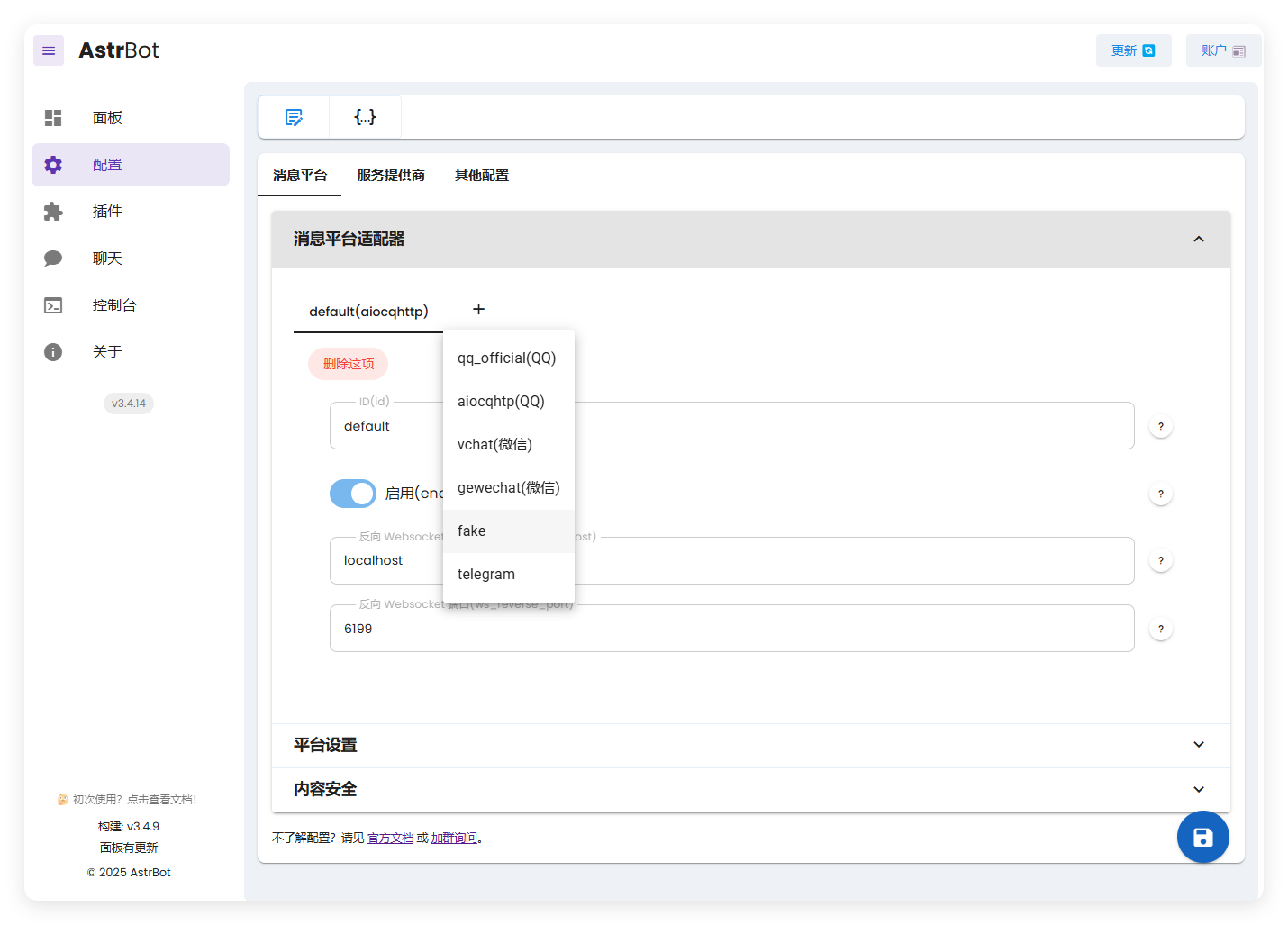
The fake adapter we created now appears here.
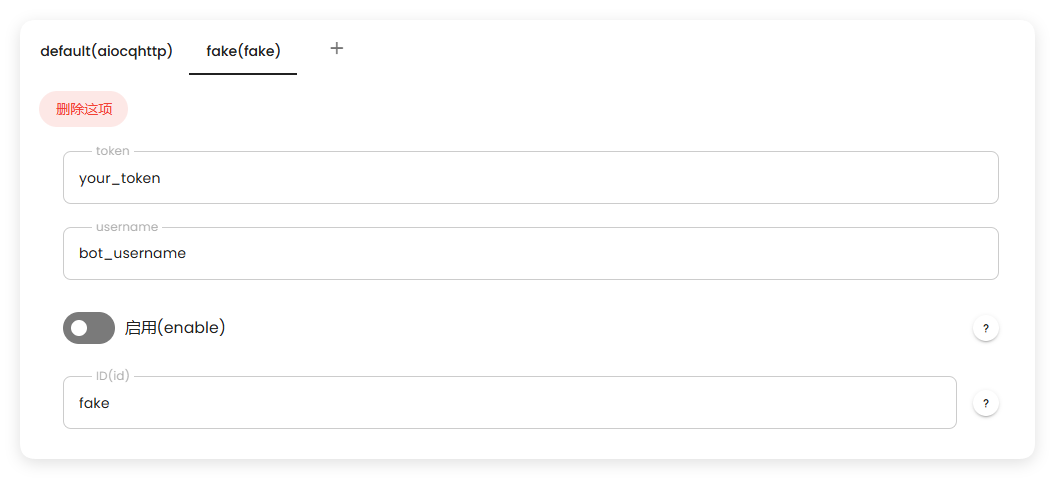
After starting, you can see it working correctly:

If you have any questions, feel free to join the community group and ask~