Skip to content
AstrBot
Main Navigation HomeBlogRoadmapHTTP API

English

简体中文

English

简体中文

Toggle dark mode

Intro & DeployMessaging PlatformsAI IntegrationUsageDevelopment
Sidebar Navigation

Introduction

What is AstrBot

Community

FAQ

Deployment

Package Manager

One-click Launcher

Docker

Kubernetes

BT Panel

1Panel

Manual

Other Deployments

CasaOS

Compshare GPU

Community-provided Deployment

Support Us

Messaging Platforms

Quick Start

QQ Official Bot

Websockets

Webhook

OneBot v11

WeCom Application

WeCom AI Bot

WeChat Official Account

Personal WeChat

Lark

DingTalk

Telegram

LINE

Slack

Mattermost

Misskey

Discord

Satori

Connect Satori

Using server-satori

Community-provided

Matrix

KOOK

VoceChat

AI Integration

✨ Model Providers

NewAPI

AIHubMix

PPIO Cloud

SiliconFlow

TokenPony

302.AI

Ollama

LMStudio

⚙️ Agent Runners

Built-in Agent Runner

Dify

Coze

Alibaba Bailian

DeerFlow

Usage

WebUI

Plugins

Built-in Commands

Tool Use

Anthropic Skills

Computer Use

SubAgent Orchestration

Proactive Tasks

MCP

Web Search

Knowledge Base

Custom Rules

Agent Runner

Unified Webhook Mode

Auto Context Compression

Agent Sandbox

Development

Plugin Development

🌠 Getting Started

Minimal Example

Listen to Message Events

Send Messages

Plugin Configuration

AI

Storage

HTML to Image

Session Control

Publish Plugin

Platform Adapter Integration

AstrBot HTTP API

AstrBot Configuration File

Others

Self-hosted HTML to Image

Open Source Summer

OSPP 2025

On this page

开发环境准备 ​

获取插件模板 ​

  1. 打开 AstrBot 插件模板: helloworld
  2. 点击右上角的 Use this template
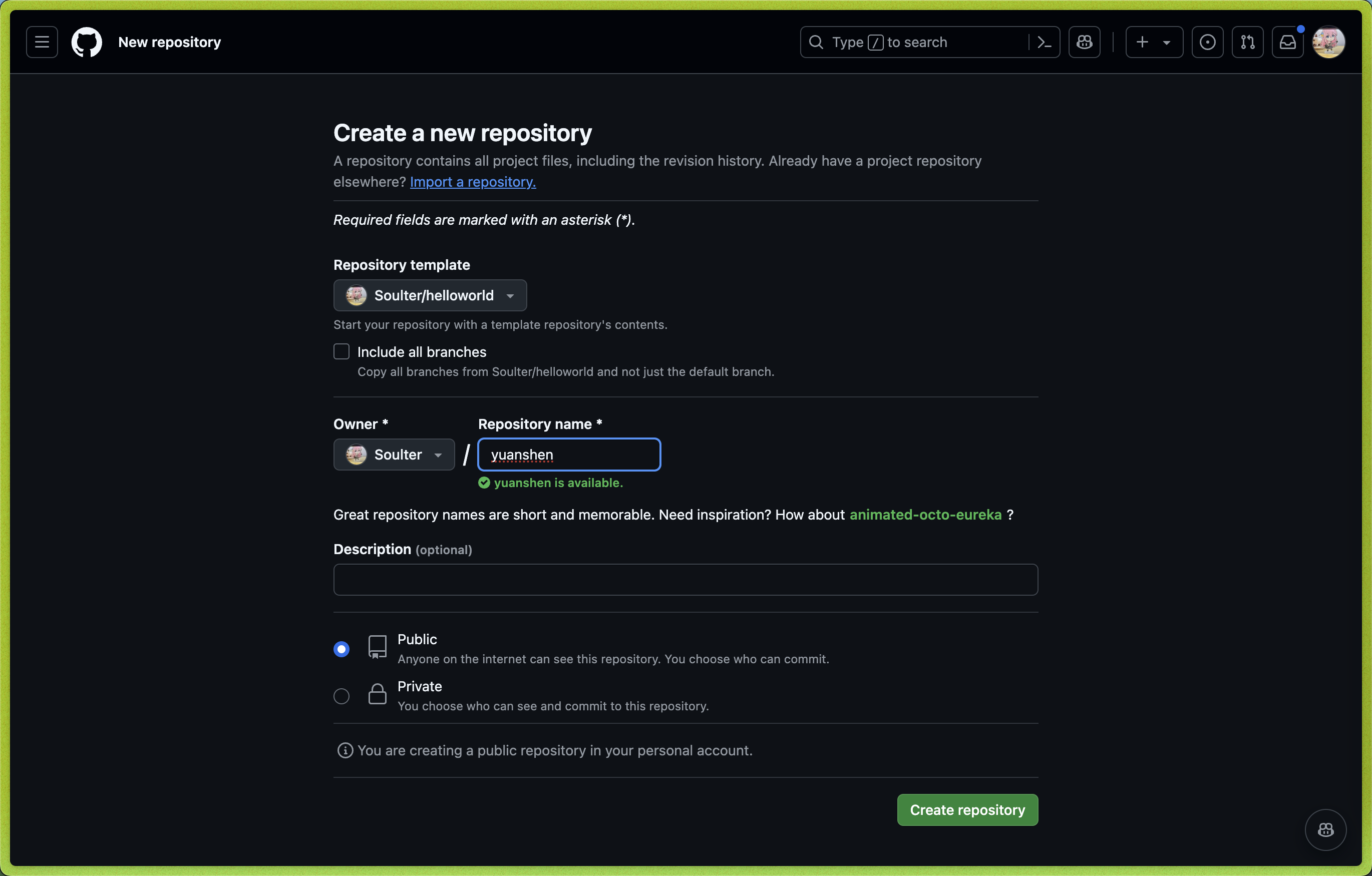
  3. 然后点击 Create new repository。
  4. 在 Repository name 处填写您的插件名。插件名格式:
    • 推荐以 astrbot_plugin_ 开头;
    • 不能包含空格;
    • 保持全部字母小写;
    • 尽量简短。
  5. 点击右下角的 Create repository。

New repo

Clone 插件和 AstrBot 项目 ​

Clone AstrBot 项目本体和刚刚创建的插件仓库到本地。

bash
git clone https://github.com/AstrBotDevs/AstrBot
mkdir -p AstrBot/data/plugins
cd AstrBot/data/plugins
git clone 插件仓库地址

然后,使用 VSCode 打开 AstrBot 项目。找到 data/plugins/<你的插件名字> 目录。

更新 metadata.yaml 文件,填写插件的元数据信息。

NOTE

AstrBot 插件市场的信息展示依赖于 metadata.yaml 文件。

调试插件 ​

AstrBot 采用在运行时注入插件的机制。因此,在调试插件时,需要启动 AstrBot 本体。

您可以使用 AstrBot 的热重载功能简化开发流程。

插件的代码修改后,可以在 AstrBot WebUI 的插件管理处找到自己的插件,点击右上角 ... 按钮,选择 重载插件。

插件依赖管理 ​

目前 AstrBot 对插件的依赖管理使用 pip 自带的 requirements.txt 文件。如果你的插件需要依赖第三方库,请务必在插件目录下创建 requirements.txt 文件并写入所使用的依赖库,以防止用户在安装你的插件时出现依赖未找到(Module Not Found)的问题。

requirements.txt 的完整格式可以参考 pip 官方文档。

Edit this page on GitHub

Last updated:

Pager
NextWhat is AstrBot

Deployed on Rainyun Logo